What makes a spreadsheet find worth saving?
A useful link is easy to verify. You can tell what the item is, which option you need, how sizing is handled, whether recent photos support the listing, and whether the price still makes sense after domestic and international shipping.
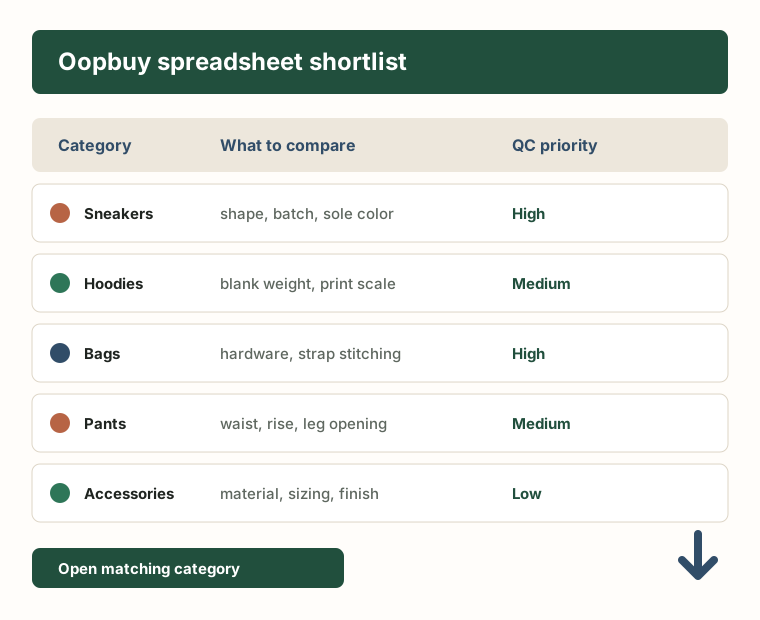
Be careful with rows that depend on one polished image, especially for shoes, jackets and bags. These are the categories where small problems become expensive: shape, thin material, weak hardware, inaccurate measurements, or a seller page that quietly changed after the link became popular.
A simple rule helps: if you cannot explain why a link is better than two similar alternatives, do not rush it into your cart. Save the reason, the risk, and a backup before you order.
Use the QC checklist before shipping
Finding items
Find useful items without rushing the order
A product list is useful when it helps you find candidates faster. Before ordering, open a few similar links, compare the current listing, and save only the items that still look worth checking at the warehouse.
Use the spreadsheet guide
Checking photos
Check photos before approving anything
Photo proof matters more than the row that led you to the item. Use warehouse pictures to confirm shape, size, stitching, color, hardware, and whether the item still matches the reason you saved it.
Open the QC checklist
Planning shipping
Plan delivery before the cart gets heavy
Shipping is where weak finds become expensive. Estimate the parcel early, watch bulky shoes and jackets, and remove anything that no longer feels worth the extra weight or volume.
Plan shipping costs
Marketplace links
Check marketplace links before ordering
Taobao, Weidian, 1688, and Yupoo links can all change after a list becomes popular. Always confirm the option, size, color, version, seller note, and return risk before sending an order through an agent.
Understand the buying flow
Agent comparison
Compare agent lists with the same rules
Different agent lists can point to similar products. Do not trust a row because it appears in a popular list. Check whether the link still opens, the options are clear, recent photos exist, and the item still makes sense after shipping.
Compare agent spreadsheet lists
Start here
What is Oopbuy, and where does the spreadsheet fit?
Oopbuy helps shoppers buy from sellers that may not ship directly overseas. A spreadsheet only helps with discovery. The real work is checking the listing, watching the order status, reviewing warehouse photos, and deciding whether each item deserves parcel space.
Read the Oopbuy overview
Before ordering
How to buy from Oopbuy without rushing the wrong item
The process is easier when you treat each stage as a checkpoint: product link, option selection, seller shipment, warehouse photos, return decision, parcel rehearsal, and final shipping.
See the buying steps